Markdownインデックスによる回答品質の向上
このページは PageTurner AI で翻訳されました(ベータ版)。プロジェクト公式の承認はありません。 エラーを見つけましたか? 問題を報告 →
より正確で文脈豊かな回答を大規模に提供するため、AskAIは整然と構造化されたコンテンツを活用します。これを実現する最も効果的な方法の1つが、Algoliaクローラー設定でMarkdownベースのインデックス作成ヘルパーを使用することです。この設定により、AskAIは整形されたコンテンツ中心のレコードにアクセス可能になります。メタデータやナビゲーション要素、レイアウト要素が生成AIの応答品質を低下させる可能性のある大規模ドキュメントサイトでは、特に重要です。
Markdownインデックスの設定は、ほとんどのケースでクローラーUIから自動化できます。高度なカスタマイズや基盤となる設定を理解する必要がある場合は、手動設定オプションも利用可能です。
注記: Docusaurus、VitePress、Astro/Starlightおよび汎用セットアップの統合例については、このページ下部のセクションを参照してください。
概要
AskAIの応答品質を最大化するには、クローラーを設定してMarkdownコンテンツ専用のインデックスを作成してください。これにより、ドキュメントやサポートコンテンツなどMarkdownベースの素材から得られる構造化されたチャンク化レコードをAskAIが処理できるようになり、応答の関連性と精度が大幅に向上します。
Markdownインデックス設定には2つの方法があります:
-
自動設定(推奨): クローラーUIを使用してMarkdownインデックスを自動的に作成・設定
-
手動設定: 高度なカスタマイズが必要な場合にクローラーを手動で設定
Markdownインデックスの自動設定(推奨)
Markdownインデックス作成を設定する最も簡単な方法は、クローラーUIを使用することです。これにより、AskAI向けに最適化されたMarkdownインデックスが自動的に作成・設定されます。
ステップ1: クローラー設定でMarkdownインデックス機能にアクセス
-
クローラーダッシュボードに移動
-
設定 → LLM向けMarkdown タブを選択
-
Markdownインデックス設定セクションが表示され、専用インデックスを作成できます
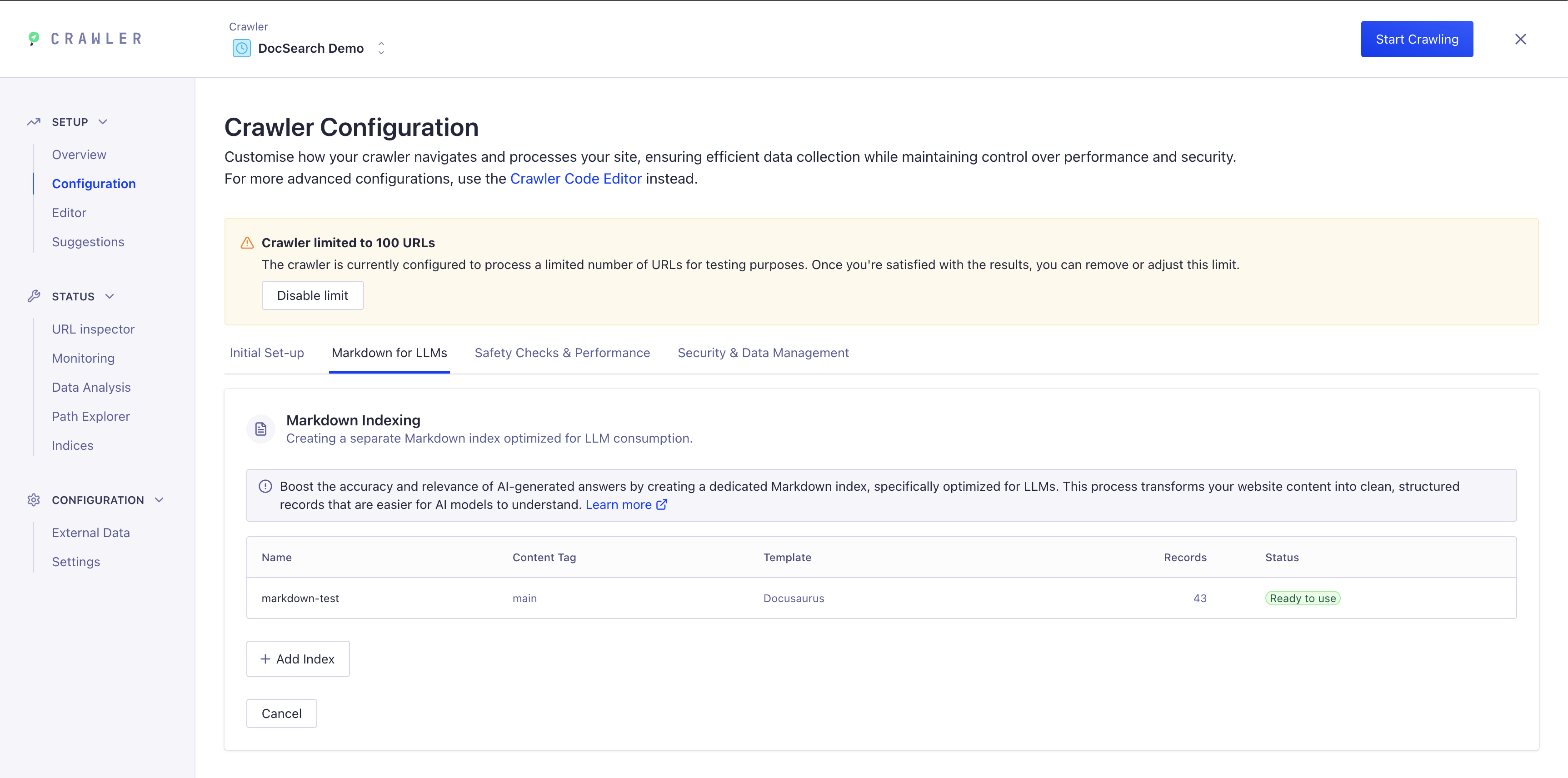
ステップ2: 新しいMarkdownインデックスを追加
-
"+ インデックス追加" をクリックして新規Markdownインデックスを作成
-
Fill in the required fields:
- Index Name: Enter a descriptive name (e.g.,
my-docs-markdown) - Content Tag: Specify the HTML content selector (typically
main) - Template: Choose the template that matches your documentation framework:
- Docusaurus - For Docusaurus sites
- VitePress - For VitePress sites
- Astro/Starlight - For Astro/Starlight sites
- Non-DocSearch (Generic) - For custom sites or other frameworks
- Index Name: Enter a descriptive name (e.g.,
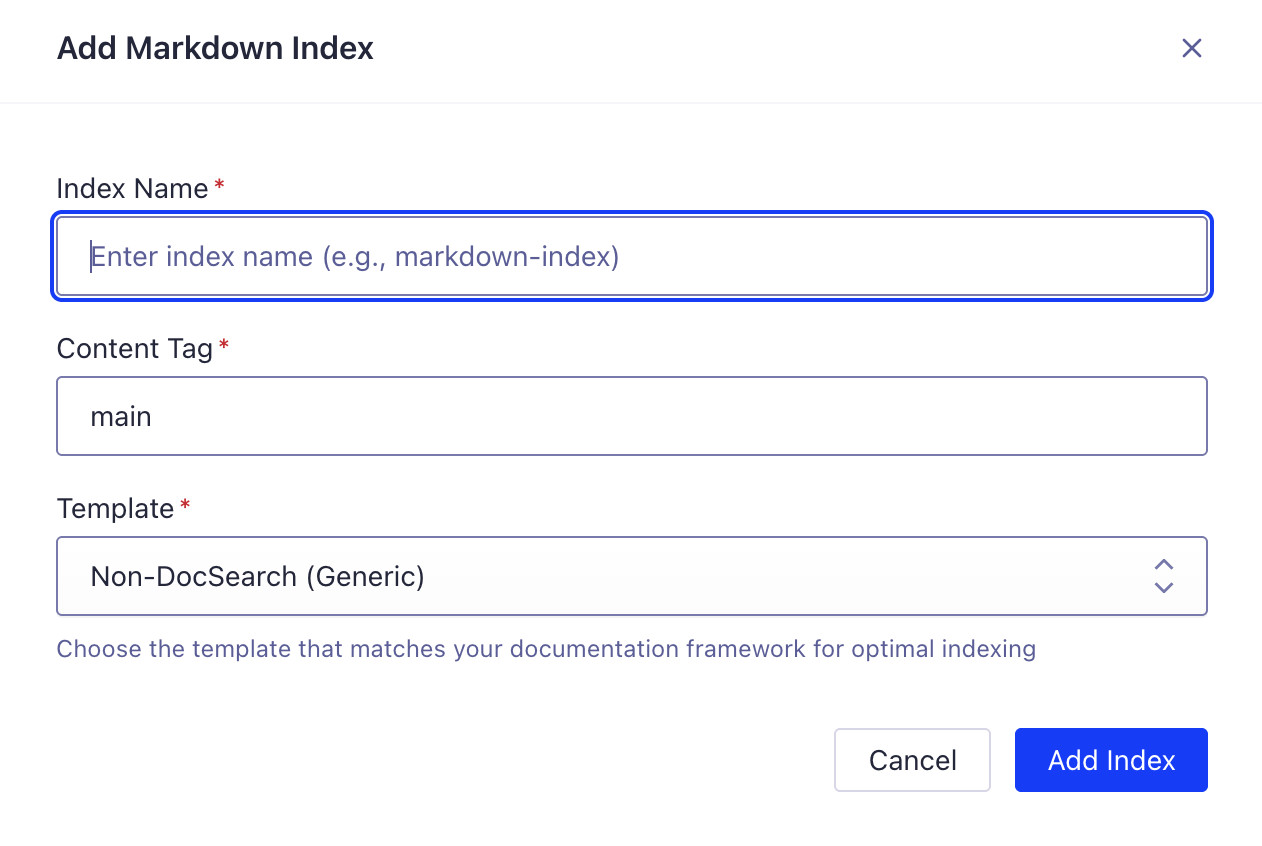
- "インデックス追加" をクリックして作成
クローラーは選択したテンプレートに最適な設定を自動的に構成します:
-
適切なレコード抽出とチャンキング
-
フレームワーク固有のメタデータ抽出(言語、バージョン、タグ)
-
AskAI向けに最適化されたインデックス設定
ステップ3: クローラーを実行
Markdownインデックス設定が完了したら:
-
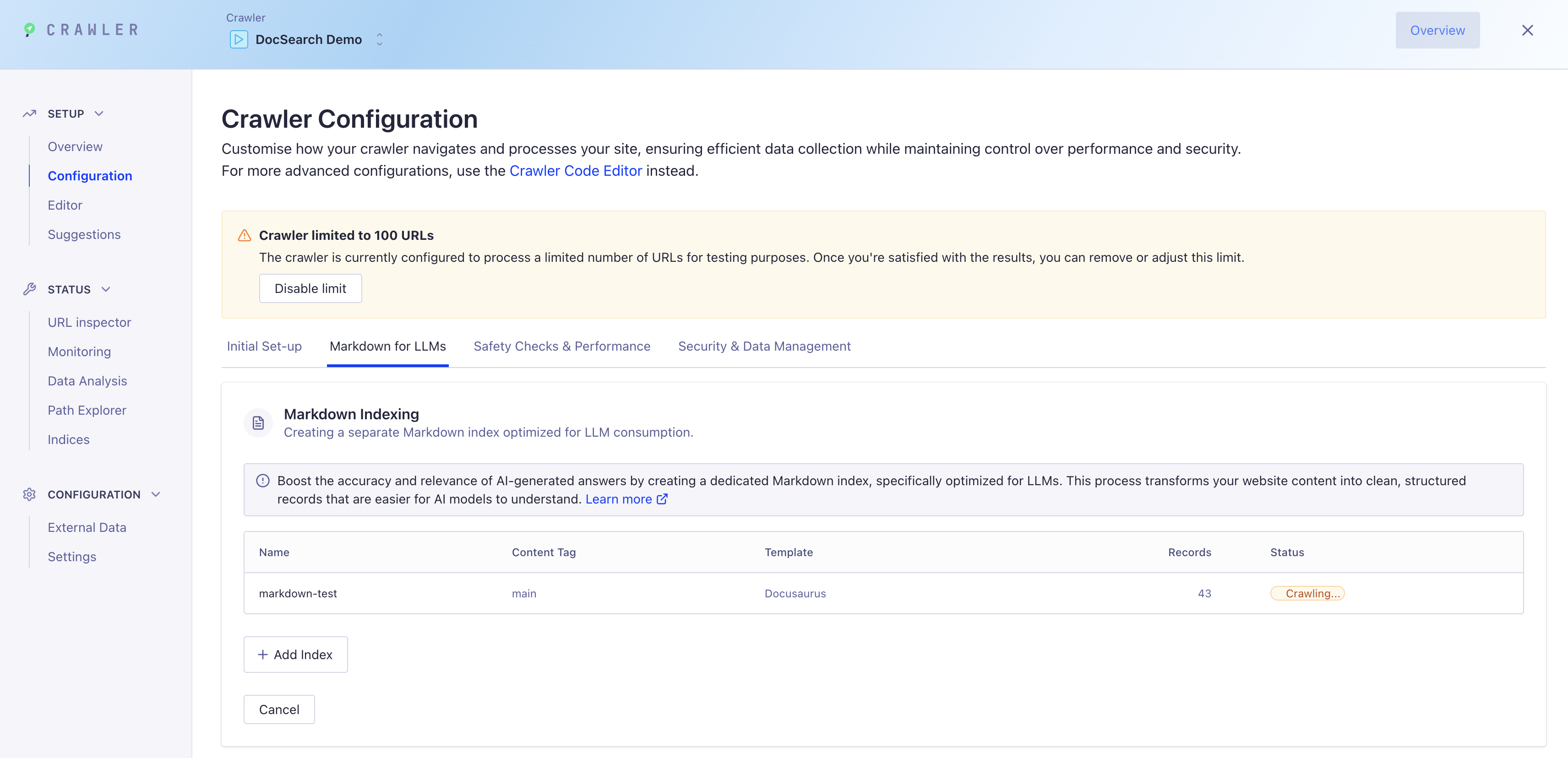
"クロール開始" をクリックしてコンテンツのインデックス作成を開始
-
ダッシュボードでクロール進捗を監視
-
新しいMarkdownインデックスには、AskAI向けに最適化されたクリーンで構造化されたレコードが取り込まれます
ステップ4: AskAIと統合する
クロール完了後、DocSearchを設定してAskAI応答に新しいMarkdownインデックスを使用します。詳細な設定手順については、下記の統合セクションを参照してください。
手動設定(上級者向け)
高度なカスタマイズが必要な場合や、基盤となる設定を理解したいユーザー向けに、Crawler設定を直接変更することでMarkdownインデックス作成を手動で設定できます。
ステップ1: 既存のDocSearch Crawler設定を更新する
- Crawler設定の
actions: [ ... ]配列に以下を追加します:
// actions: [ ...,
{
  indexName: "my-markdown-index",
  pathsToMatch: ["https://example.com/docs/**"],
  recordExtractor: ({ $, url, helpers }) => {
    // Target only the main content, excluding navigation
    const text = helpers.markdown(
      "main > *:not(nav):not(header):not(.breadcrumb)",
    );

    if (text === "") return [];

    const language = $("html").attr("lang") || "en";

    const title = $("head > title").text();

    // Get the main heading for better searchability
    const h1 = $("main h1").first().text();

    return helpers.splitTextIntoRecords({
      text,
      baseRecord: {
        url,
        objectID: url,
        title: title || h1,
        heading: h1, // Add main heading as separate field
        lang: language,
      },
      maxRecordBytes: 100000, // Higher = fewer, larger records. Lower = more, smaller records.
      // Note: Increasing this value may increase the token count for LLMs, which can affect context size and cost.
      orderingAttributeName: "part",
    });
  },
},
// ...],
- 次に、
initialIndexSettings: { ... }オブジェクトに以下を追加します:
// initialIndexSettings: { ...,
"my-markdown-index": {
  attributesForFaceting: ["lang"],
  ignorePlurals: true,
  minProximity: 1,
  removeStopWords: false,
  searchableAttributes: ["title", "heading", "unordered(text)"],
  removeWordsIfNoResults: "lastWords",
  attributesToHighlight: ["title", "text"],
  typoTolerance: false,
  advancedSyntax: false,
},
// ...},
ステップ2: DocSearchクローラーを実行してAskAI最適化インデックスを作成
Crawler設定を更新後:
-
Algolia Crawlerダッシュボードで設定を公開し、保存・有効化します。
-
クローラーを実行してMarkdownコンテンツをインデックス化し、新しいインデックスを作成します。
クローラーはMarkdown抽出ヘルパーを使用してコンテンツを処理し、新しいインデックスにAskAI向けに最適化されたクリーンで構造化されたレコードを取り込みます。
ヒント: すべてのページが正しく処理されていることを確認するため、ダッシュボードでクロール進捗を監視してください。Algoliaインデックスでインデックス化されたレコードを表示し、構造とコンテンツを検証できます。
AskAIと新しいインデックスを統合する
最適化されたインデックスがクローラーで作成されたら、DocSearchを使用する方法(ほとんどのユーザーに推奨)か、AskAI APIを使用したカスタム統合を構築する2つの方法で統合できます。
- DocSearch Integration
- Custom API Integration
Using DocSearch
Configure DocSearch to use both your main keyword index and your markdown index for Ask AI:
- JavaScript
- React
docsearch({
  indexName: 'YOUR_INDEX_NAME', // Main DocSearch keyword index
  apiKey: 'YOUR_SEARCH_API_KEY',
  appId: 'YOUR_APP_ID',
  askAi: {
    indexName: 'YOUR_INDEX_NAME-markdown', // Markdown index for Ask AI
    apiKey: 'YOUR_SEARCH_API_KEY', // (or a different key if needed)
    appId: 'YOUR_APP_ID',
    assistantId: 'YOUR_ALGOLIA_ASSISTANT_ID',
    searchParameters: {
      facetFilters: ['language:en'], // Optional: filter to specific language/version
    },
  },
});
<DocSearch
  indexName="YOUR_INDEX_NAME" // Main DocSearch keyword index
  apiKey="YOUR_SEARCH_API_KEY"
  appId="YOUR_APP_ID"
  askAi={{
    indexName: 'YOUR_INDEX_NAME-markdown', // Markdown index for Ask AI
    apiKey: 'YOUR_SEARCH_API_KEY',
    appId: 'YOUR_APP_ID',
    assistantId: 'YOUR_ALGOLIA_ASSISTANT_ID',
    searchParameters: {
      facetFilters: ['language:en'], // Optional: filter to specific language/version
    },
  }}
/>
indexName: Your main DocSearch index for keyword search.askAi.indexName: The markdown index you created for Ask AI context.assistantId: The ID of your configured Ask AI assistant.searchParameters.facetFilters: Optional filters to limit Ask AI context (useful for multi-language sites).
Custom API Integration
We highly recommend using the DocSearch package for most use cases. Custom implementations using the Ask AI API directly are not fully supported to the same extent as the DocSearch package, and may require additional development effort for features like error handling, authentication, and UI components.
Build your own chat interface using the Ask AI API. This gives you full control over the user experience and allows for advanced customizations.
class CustomAskAI {
  constructor({ appId, apiKey, indexName, assistantId }) {
    this.appId = appId;
    this.apiKey = apiKey;
    this.indexName = indexName; // Your markdown index
    this.assistantId = assistantId;
    this.baseUrl = 'https://askai.algolia.com';
  }

  async getToken() {
    const response = await fetch(`${this.baseUrl}/chat/token`, {
      method: 'POST',
      headers: {
        'X-Algolia-Assistant-Id': this.assistantId,
      },
    });
    const data = await response.json();
    return data.token;
  }

  async sendMessage(conversationId, messages, searchParameters = {}) {
    const token = await this.getToken();

    const response = await fetch(`${this.baseUrl}/chat`, {
      method: 'POST',
      headers: {
        'Content-Type': 'application/json',
        'X-Algolia-Application-Id': this.appId,
        'X-Algolia-API-Key': this.apiKey,
        'X-Algolia-Index-Name': this.indexName, // Use your markdown index
        'X-Algolia-Assistant-Id': this.assistantId,
        'Authorization': token,
      },
      body: JSON.stringify({
        id: conversationId,
        messages,
        ...(Object.keys(searchParameters).length > 0 && { searchParameters }),
      }),
    });

    if (!response.ok) {
      throw new Error(`HTTP error! status: ${response.status}`);
    }

    // Handle streaming response
    const reader = response.body.getReader();
    const decoder = new TextDecoder();

    return {
      async *[Symbol.asyncIterator]() {
        try {
          while (true) {
            const { done, value } = await reader.read();
            if (done) break;

            const chunk = decoder.decode(value, { stream: true });
            if (chunk.trim()) {
              yield chunk;
            }
          }
        } finally {
          reader.releaseLock();
        }
      }
    };
  }
}

// Usage
const askAI = new CustomAskAI({
  appId: 'YOUR_APP_ID',
  apiKey: 'YOUR_API_KEY',
  indexName: 'YOUR_INDEX_NAME-markdown', // Your markdown index
  assistantId: 'YOUR_ASSISTANT_ID',
});

// Send a message with facet filters for your markdown index
const stream = await askAI.sendMessage('conversation-1', [
  {
    role: 'user',
    content: 'How do I configure my API?',
    id: 'msg-1',
  },
], {
  facetFilters: ['language:en', 'type:content'] // Filter to relevant content
});

// Handle streaming response
for await (const chunk of stream) {
  console.log(chunk); // Handle each chunk of the response
}
Benefits of custom integration:
- Full control over UI/UX
- Custom authentication and session management
- Advanced filtering and search parameters for your markdown index
- Integration with existing chat systems
- Custom analytics and monitoring
📚 Learn More: For complete API documentation, authentication details, advanced examples, and more integration patterns, see the Ask AI API Reference.
Using Facet Filters with Your Markdown Index:
Since your markdown index includes attributes like lang, version, and docusaurus_tag, you can filter Ask AI's context precisely:
// Example: Filter to English documentation only
const searchParameters = {
  facetFilters: ['lang:en']
};

// Example: Filter to specific version and content type
const searchParameters = {
  facetFilters: ['lang:en', 'version:latest', 'type:content']
};

// Example: Use OR logic for multiple tags (from your integration examples)
const searchParameters = {
  facetFilters: [
    'lang:en',
    [
      'docusaurus_tag:default',
      'docusaurus_tag:docs-default-current'
    ]
  ]
};
ヒント: ドキュメントが進化しても最高の検索品質とAI回答品質を維持するため、両方のインデックスを最新状態に保ってください。
ベストプラクティスとヒント
-
検索性向上のため、Markdownファイルで明確で一貫性のあるタイトルを使用してください。
-
インデックスをテストする: AskAIを使用して関連する回答が返されることを確認
-
maxRecordBytesを調整する: 回答が広範囲すぎる/断片化しすぎている場合に調整- 注記:
maxRecordBytesを増やすとLLMのトークン数が増加し、コンテキストウィンドウのサイズやAskAI応答のコストに影響する可能性があります
- 注記:
-
最適なチャンキングのため、見出しやリストなどを使用してMarkdownを適切に構造化してください。
-
属性を追加する: レコードに
lang、version、tagsなどの属性とattributesForFacetingを追加(検索UIやAskAIでのフィルタリング/ファセット化を可能にするため)
よくある質問
Q: なぜ専用のMarkdownインデックスを使用するのですか?
A: AskAIがLLM向けに最適化された形式でコンテンツにアクセスできるようになり、回答品質が向上するためです
Q: 他のコンテンツタイプでも使用可能ですか?
A: 可能ですが、Markdownは特にチャンキングとコンテキスト抽出に適しています。
Q: 非常に大きなMarkdownファイルがある場合は?
A: maxRecordBytes値を下げてコンテンツをより小さく焦点化されたレコードに分割してください。
詳細については、AskAIドキュメントを参照するか、クローラーの設定に助けが必要な場合はサポートに連絡してください。
統合別クローラー設定例
以下は主要ドキュメントプラットフォーム向けMarkdownインデックス設定の例です。各例では言語・バージョン・タグなどのファセット抽出方法と、統合向けクローラー設定方法を示しています:
- Non-DocSearch (Generic)
- Docusaurus
- VitePress
- Astro / Starlight
Generic Example:
// In your Crawler config:

// actions: [ ...,
{
  indexName: "my-markdown-index",
  pathsToMatch: ["https://example.com/**"],
  recordExtractor: ({ $, url, helpers }) => {
    // Target only the main content, excluding navigation
    const text = helpers.markdown(
      "main > *:not(nav):not(header):not(.breadcrumb)",
    );

    if (text === "") return [];

    const language = $("html").attr("lang") || "en";

    const title = $("head > title").text();

    // Get the main heading for better searchability
    const h1 = $("main h1").first().text();

    return helpers.splitTextIntoRecords({
      text,
      baseRecord: {
        url,
        objectID: url,
        title: title || h1,
        heading: h1, // Add main heading as separate field
        lang: language,
      },
      maxRecordBytes: 100000, // Higher = fewer, larger records. Lower = more, smaller records.
      // Note: Increasing this value may increase the token count for LLMs, which can affect context size and cost.
      orderingAttributeName: "part",
    });
  },
},
// ...],

// initialIndexSettings: { ...,
"my-markdown-index": {
  attributesForFaceting: ["lang"], // Recommended if you add more attributes outside of objectID
  ignorePlurals: true,
  minProximity: 1,
  removeStopWords: false,
  searchableAttributes: ["title", "heading", "unordered(text)"],
  removeWordsIfNoResults: "lastWords",
  attributesToHighlight: ["title", "text"],
  typoTolerance: false,
  advancedSyntax: false,
},
// ...},
Docusaurus Example:
// In your Crawler config:

// actions: [ ...,
{
  indexName: "my-markdown-index",
  pathsToMatch: ["https://example.com/docs/**"],
  recordExtractor: ({ $, url, helpers }) => {
    // Target only the main content, excluding navigation
    const text = helpers.markdown(
      "main > *:not(nav):not(header):not(.breadcrumb)",
    );

    if (text === "") return [];

    // Extract meta tag values. These are required for Docusaurus
    const language =
      $('meta[name="docsearch:language"]').attr("content") || "en";
    const version =
      $('meta[name="docsearch:version"]').attr("content") || "latest";
    const docusaurus_tag =
      $('meta[name="docsearch:docusaurus_tag"]').attr("content") || "";

    const title = $("head > title").text();

    // Get the main heading for better searchability
    const h1 = $("main h1").first().text();

    return helpers.splitTextIntoRecords({
      text,
      baseRecord: {
        url,
        objectID: url,
        title: title || h1,
        heading: h1, // Add main heading as separate field
        lang: language, // Required for Docusaurus
        language, // Required for Docusaurus
        version: version.split(","), // in case there are multiple versions. Required for Docusaurus
        docusaurus_tag: docusaurus_tag // Required for Docusaurus
          .split(",")
          .map((tag) => tag.trim())
          .filter(Boolean),
      },
      maxRecordBytes: 100000, // Higher = fewer, larger records. Lower = more, smaller records.
      // Note: Increasing this value may increase the token count for LLMs, which can affect context size and cost.
      orderingAttributeName: "part",
    });
  },
},
// ...],

// initialIndexSettings: { ...,
"my-markdown-index": {
  attributesForFaceting: ["lang", "language", "version", "docusaurus_tag"], // Required for Docusaurus
  ignorePlurals: true,
  minProximity: 1,
  removeStopWords: false,
  searchableAttributes: ["title", "heading", "unordered(text)"],
  removeWordsIfNoResults: "lastWords",
  attributesToHighlight: ["title", "text"],
  typoTolerance: false,
  advancedSyntax: false,
},
// ...},
VitePress Example:
// In your Crawler config:

// actions: [ ...,
{
  indexName: "my-markdown-index",
  pathsToMatch: ["https://example.com/docs/**"],
  recordExtractor: ({ $, url, helpers }) => {
    // Target only the main content, excluding navigation
    const text = helpers.markdown(
      "main > *:not(nav):not(header):not(.breadcrumb)",
    );

    if (text === "") return [];

    const language = $("html").attr("lang") || "en";

    const title = $("head > title").text();

    // Get the main heading for better searchability
    const h1 = $("main h1").first().text();

    return helpers.splitTextIntoRecords({
      text,
      baseRecord: {
        url,
        objectID: url,
        title: title || h1,
        heading: h1, // Add main heading as separate field
        lang: language, // Required for VitePress
      },
      maxRecordBytes: 100000, // Higher = fewer, larger records. Lower = more, smaller records.
      // Note: Increasing this value may increase the token count for LLMs, which can affect context size and cost.
      orderingAttributeName: "part",
    });
  },
},
// ...],

// initialIndexSettings: { ...,
"my-markdown-index": {
  attributesForFaceting: ["lang"], // Required for VitePress
  ignorePlurals: true,
  minProximity: 1,
  removeStopWords: false,
  searchableAttributes: ["title", "heading", "unordered(text)"],
  removeWordsIfNoResults: "lastWords",
  attributesToHighlight: ["title", "text"],
  typoTolerance: false,
  advancedSyntax: false,
},
// ...},
Astro / Starlight Example:
// In your Crawler config:

// actions: [ ...,
{
  indexName: "my-markdown-index",
  pathsToMatch: ["https://example.com/docs/**"],
  recordExtractor: ({ $, url, helpers }) => {
    // Target only the main content, excluding navigation
    const text = helpers.markdown(
      "main > *:not(nav):not(header):not(.breadcrumb)",
    );

    if (text === "") return [];

    const language = $("html").attr("lang") || "en";

    const title = $("head > title").text();

    // Get the main heading for better searchability
    const h1 = $("main h1").first().text();

    return helpers.splitTextIntoRecords({
      text,
      baseRecord: {
        url,
        objectID: url,
        title: title || h1,
        heading: h1, // Add main heading as separate field
        lang: language, // Required for Astro/StarLight
      },
      maxRecordBytes: 100000, // Higher = fewer, larger records. Lower = more, smaller records.
      // Note: Increasing this value may increase the token count for LLMs, which can affect context size and cost.
      orderingAttributeName: "part",
    });
  },
},
// ...],

// initialIndexSettings: { ...,
"my-markdown-index": {
  attributesForFaceting: ["lang"], // Required for Astro/StarLight
  ignorePlurals: true,
  minProximity: 1,
  removeStopWords: false,
  searchableAttributes: ["title", "heading", "unordered(text)"],
  removeWordsIfNoResults: "lastWords",
  attributesToHighlight: ["title", "text"],
  typoTolerance: false,
  advancedSyntax: false,
},
// ...},
各例では、一般的なファセットの抽出方法と、AskAI向けMarkdownインデックスの設定方法を示します。サイトに合わせてセレクターやメタタグ名を調整してください。